Creative Minds 𖹭 Happy Hearts

Testing Which Bridge Shape Holds the Most Weight, Three Bridge Types
Craft sticks, coins, and a simple question, which bridge shape holds the most weight, turns an afternoon into a genuine engineering investigation your student will not forget.
This lab sheet walks your homeschooler through a structured comparison of three classic bridge designs: the flat beam bridge, the triangular truss bridge, and the arched bridge. Students form a hypothesis, build each bridge to identical dimensions using craft sticks or straws and glue or tape, then stack weights (coins or washers) at the center until each structure fails. The data table records number of weights held and what happened to each bridge, making results easy to compare. Suited for grades 4-6, the bridge shape holds the most weight experiment builds vocabulary around structural engineering while grounding abstract concepts in hands-on testing.
This sheet works as a standalone lesson or as an anchor activity inside a simple machines or engineering unit study. After recording observations and completing the conclusion questions, your student articulates why one shape outperformed the others, a reasoning step that moves beyond data collection into scientific explanation. The closing prompt encourages further inquiry by asking what other shapes could be tested, keeping the investigation open-ended for students who want to go further.
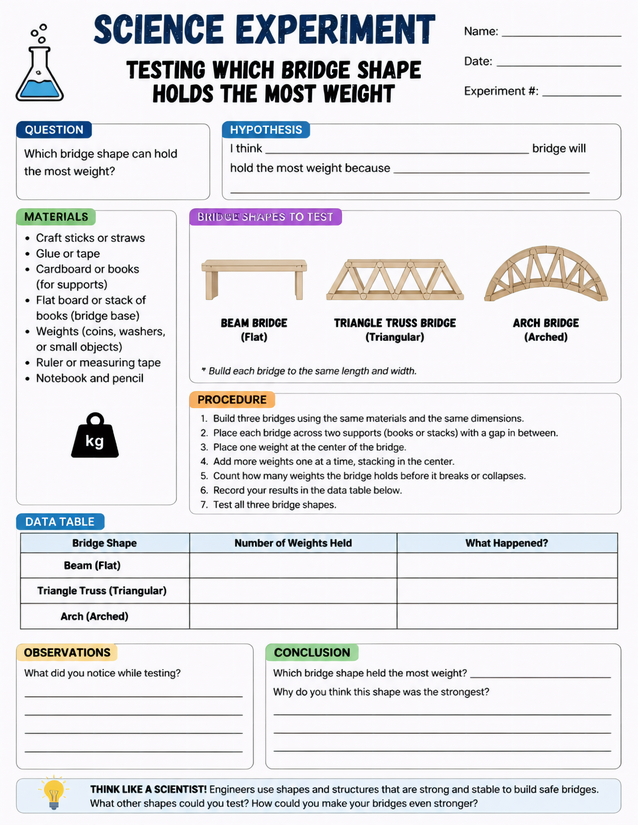
Beam, truss, and arch designs go head to head in this bridge shape holds the most weight experiment for grades 4-6 homeschoolers.
Getting Started with the Bridge Shape Holds the Most Weight Lab

Usage Notes
Craft sticks or straws, glue or tape, cardboard or books for supports, and small weights like coins or washers are all household items your family likely already owns. A ruler or measuring tape is listed to keep bridge dimensions consistent across all three builds, which is the variable that makes the comparison fair. No safety concerns are flagged on the sheet, though adult supervision around glue guns is a reasonable precaution if your student opts for that adhesive.
Printing Tips
Standard 20-lb copy paper works fine, but 24-lb gives a sturdier surface for writing during an active build session where hands may be gluey or damp. Slip the sheet into a plastic page protector or clip it to a clipboard beside the build area so your student can reference the procedure and fill in the data table without the sheet sliding around.